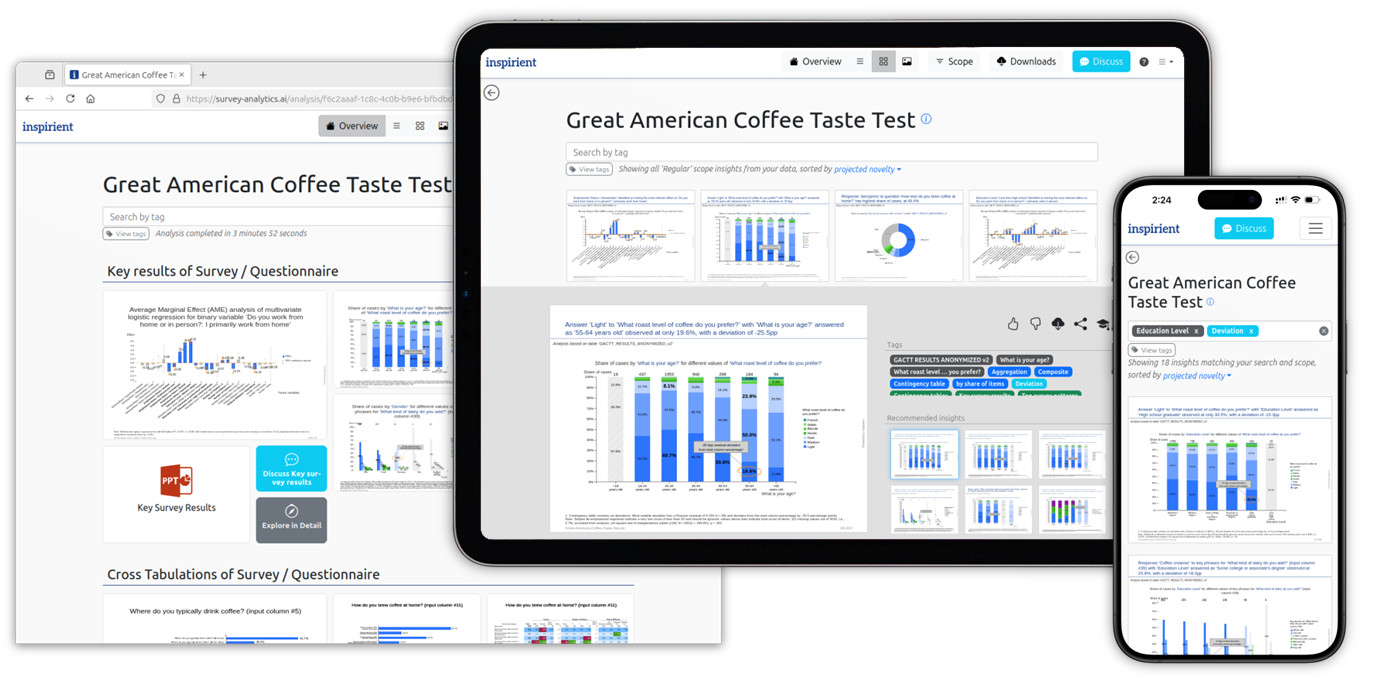
AI, without the risk. Check data quality, explore cross-tabs, generate presentation-ready slides, and ask questions about your results.


  • LLM-free calculations
  • Expert-level statistics
  • Guaranteed reproducibility
Screenshot: Automatically generated analyses

From Raw Data to Insights in Minutes

Upload your survey data

Excel · SPSS · CSV

Inspirient analyzes it

Quality checks, statistics, and insight discovery

Explore and share results

Use the outputs that fit your research

Your Results, Ready to Use

Survey quality assessment
Cross-tab tables
PowerPoint slides
Chat with your results

7 days free, then €499/month.

Credit card required · Cancel before your trial ends to avoid charges.

Create your account

Next: activate your trial securely through Stripe.

Password requirements
  • Your password can’t be too similar to your other personal information.
  • Your password must contain at least 10 characters.
  • Your password can’t be a commonly used password.
  • Your password can’t be entirely numeric.
  • Your password must contain at least one number, one letter, and one special character.

Already have an account? Sign in.

Inspirient's data import component is responsible for ingesting the source data into Inspirient's internal data structure for subsequent analysis. To achieve this, the component performs the following tasks:

  • Format detection of the input data source, which includes Excel, IBM SPSS, CSV1, and RDBMS2
  • Automatic table detection for semi-structured data sources, for example Excel files containing multiple tables with non-tabular meta-information
  • Classification of input dimensions by structural properties, e.g., automatic detection of yes/no values, numeric values including inference of decimal and thousands separators, text values, and date values from different locales
  1. Comma-Separated Values
  2. Relational Database Management System

Inspirient's data cleaning & transformation component performs common data wrangling tasks, such as:

  • Standardization of values, e.g., dates of varying formats transformed to a standard format or country values transformed to ISO1 codes
  • Consolidation of data sources, i.e., relationship inference between tables for fully automatic joining and/or concatenating
  • Data garbage handling, i.e., erroneous values appropriately transformed given the underlying data type and context
  1. International Organization for Standardization

Inspirient's quality assessment component carries out a comprehensive set of checks to assess the quality of the data and proposes actions to increase accuracy, such as:

  • Checking for general data quality issues1, incl. missing values, anomalous time-values, suitable primary key columns
  • Use-case-specific checks, such as detection of straightliners, speeders, similar interviews, and interviewer effect for survey datasets2
  1. Reference list of Inspirient's Data Quality Assessment checks
  2. Survey Quality Assurance at Kantar Public

Inspirient's Automated Analytics Engine has been trained to perform statistical analyses at the level of a senior statistician1, for example, the system:

  • Checks aggregations for significant patterns across relevant cohorts, incl. calculating all contingency tables with significance testing and the compilation of all relevant cross tabulations
  • Explores hidden relationships between numeric and categorical variables, including network analysis and multivariate regression with average marginal effect estimation
  • Explains discovered patterns using rules described in natural language text through root cause analysis
  1. Survey Analysis Automation at Kantar Public

Inspirient's Automated Analytics Engine generates a comprehensive set of results for survey datasets, i.e., all combinations of socio-demographic variables compared with each survey question. Identified insights are automatically prioritized by the system based on the statistical significance of the pattern and the importance of the dimensions used in the analysis.

Additionally, the system learns over time which insights matter most to whom in order to continuously improve its recommendations with each new analysis.

Inspirient's Survey Analysis solution generates all the required output for enabling quick decision-making. For example, the system automatically generates:

  • Contingency tables, as Excel files, for all combinations of socio-demographic variables and survey questions, incl. statistical significance testing and highlighting of anomalies
  • Supporting files that enable efficient investigation into data quality issues or drilling down into the details of an insight
  • Automatically generated ready-to-present reports, such as the Survey Quality Assessment and the Top 10 Contingency Table Patterns which can be rendered as narrated presentations1
  1. Sample analysis presentation automatically generated by Inspirient
Get started

…and get your survey insights in minutes!